Overview
OpenWeatherMap is one of the most popular weather APIs, providing current conditions, forecasts, and historical data for millions of locations worldwide. It offers a generous free tier with 1,000 API calls per day, making it ideal for hobby projects and prototypes. Beginners can quickly display current temperature, humidity, and weather descriptions with just a city name or coordinates.
Beginner Tip
Sign up at openweathermap.org to get a free API key instantly. Use the units=metric or units=imperial parameter to get temperatures in Celsius or Fahrenheit without any conversion.
Available Data
The kind of data this API exposes, based on its documentation. We could not call the endpoint to confirm the exact field names.
Example Response
Illustrative shape only — we were not able to call this endpoint (it requires credentials or exposes no public sample URL), so the fields below show the kind of data this API returns rather than a recorded response.
{
  "location": "Tokyo",
  "temperature": {
    "current": 22,
    "feels_like": 24,
    "min": 18,
    "max": 26
  },
  "condition": "Partly Cloudy",
  "humidity": 65,
  "wind": {
    "speed": 12,
    "direction": "NE"
  },
  "forecast": [
    {
      "date": "2025-01-16",
      "high": 25,
      "low": 17,
      "condition": "Sunny"
    }
  ]
}
Field Reference
main.temp Current temperature in the unit specified by the units parameter (default Kelvin) main.humidity Current relative humidity as a percentage (0-100) weather[0].description Human-readable weather condition description such as "light rain" or "clear sky" wind.speed Wind speed in meters per second (or mph if units=imperial) dt Unix timestamp of the data calculation time in UTC sys.country Two-letter country code (ISO 3166) for the location Implementation Example
Calls a real endpoint of this API. Replace any placeholder credentials with your own key.
// Get current weather by coordinates
const url = "https://api.openweathermap.org/data/2.5/weather?lat=44.34&lon=10.99&appid=YOUR_API_KEY&units=metric";

const response = await fetch(url);
if (!response.ok) throw new Error(`Request failed: ${response.status}`);
const data = await response.json();

console.log(`Temperature: ${data.main.temp}°C`);
console.log(`Conditions: ${data.weather[0].description}`);
console.log(`Humidity: ${data.main.humidity}%`); What Can You Build?
Note: These code examples are AI-generated and unverified. Always refer to the official API documentation for accurate usage.
Visual Guide
Getting Your API Key — Step by Step
Step 1: Create a free account
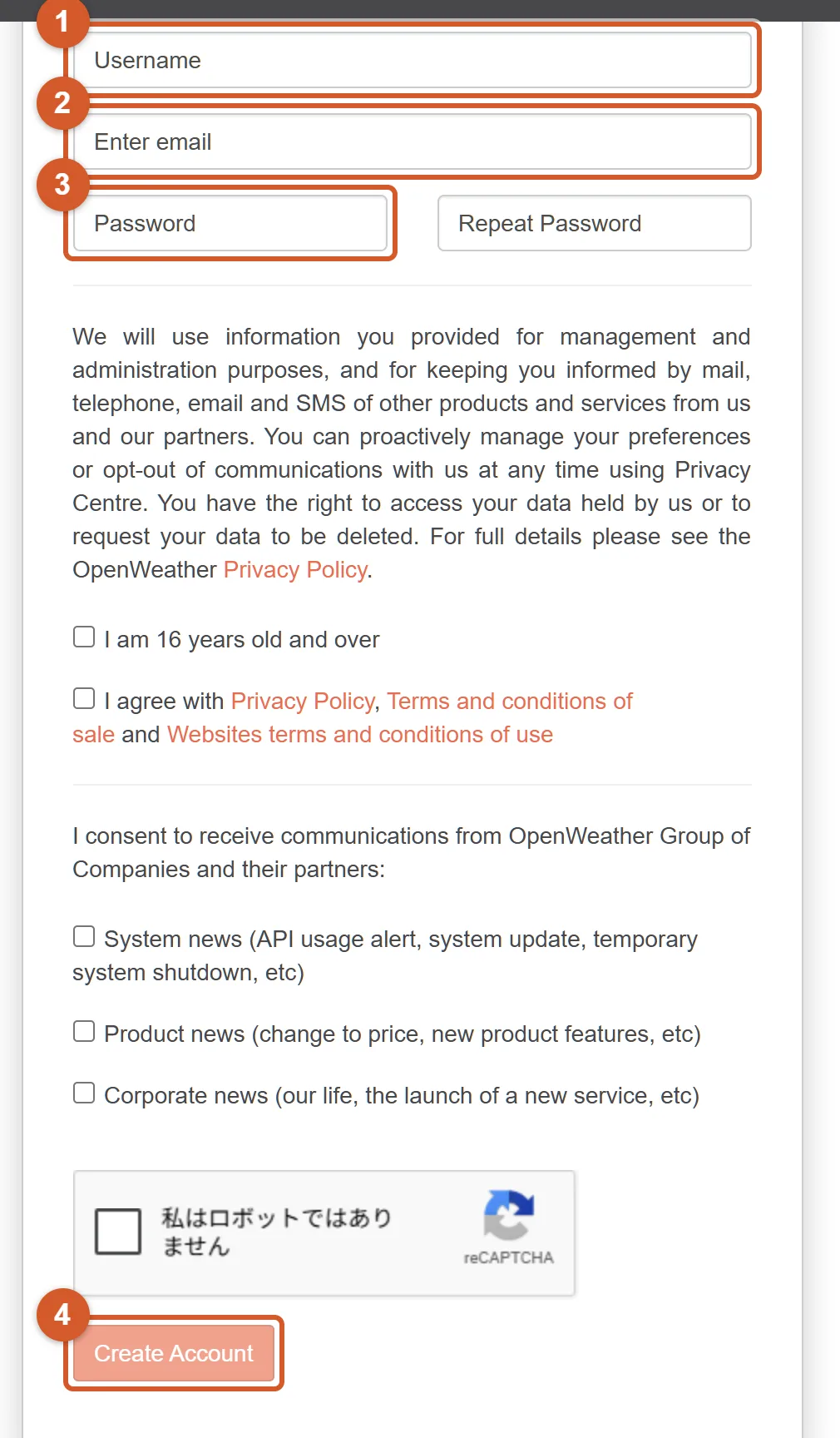
- 1 Choose a username — this is just your display name on the platform.
- 2 Enter your email address — you will need to verify it, so use a real inbox.
- 3 Set a password for your new account.
- 4 Tick the reCAPTCHA checkbox, then click Create Account. Verify your email; your API key is activated automatically, but activation can take up to two hours.
Step 2: Use the key in your request
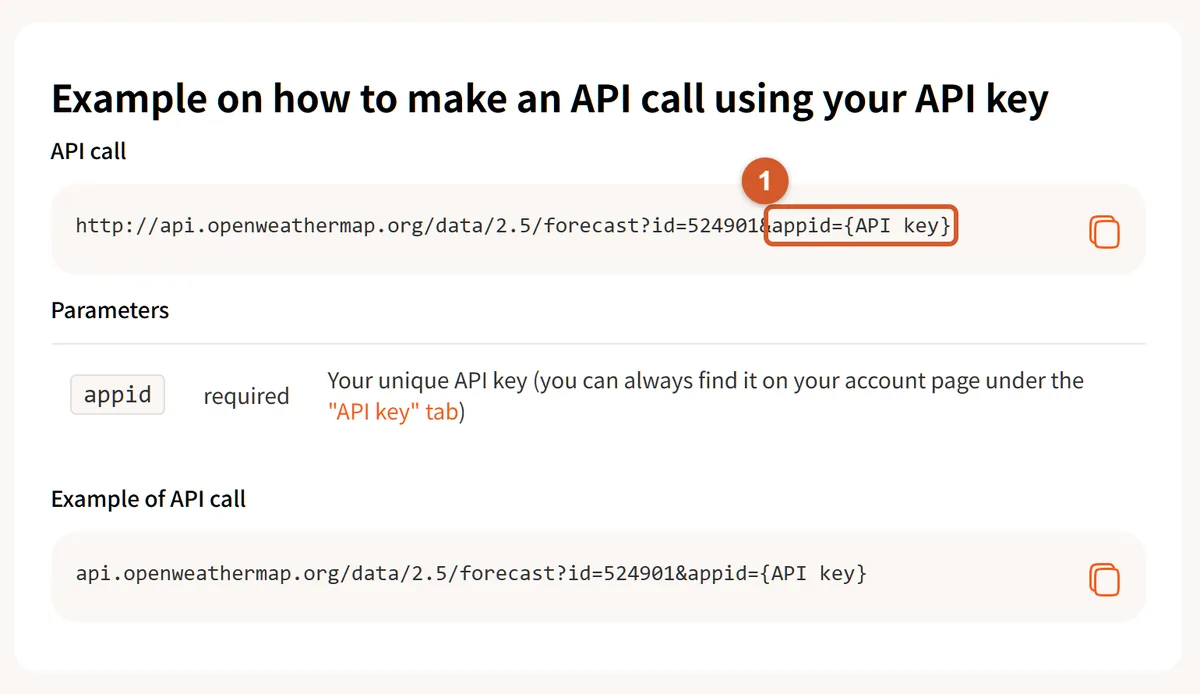
- 1 Pass your key as the appid query parameter — replace {API key} with your own key to authenticate the request. Never commit your key to a public repository; keep it in an environment variable instead.
Common Errors & Troubleshooting
Generated guidance based on this API's documentation, not observed by us. Treat it as a starting point and check against the provider's own error reference.
Metadata Score Breakdown
Estimated from metadata — endpoint not independently tested
Metadata estimate · endpoint not independently tested
Technical Specifications
Related Tags
Alternatives to OpenWeatherMap
Technical alternatives for different use cases.
More affordable with larger free tier
Minute-by-minute precipitation forecasts
Budget projects needing decent weather data
Includes air pollution API alongside weather data
Dedicated air quality monitoring with detailed pollutant data
Apps that need both weather and air quality in one API
Fully open-source, no API key required for non-commercial use
Open-source projects and non-commercial use
Commercial applications needing SLA guarantees
Strong historical weather data going back decades
Historical weather analysis and climate research
Real-time weather alerts and push notifications
Comparable coverage with more generous free tier (1M calls/month vs 1K)
Developers who need higher free tier limits
Legacy integrations already using OpenWeatherMap
Simpler API with focus on current weather and historical data
Simple current-weather lookups with minimal setup
Forecast accuracy and granular hourly predictions
Recipes Using OpenWeatherMap
Build something with this API. Each recipe includes step-by-step instructions and code outlines.
Similar APIs
View All →AccuWeather
AccuWeather's API provides highly detailed weather forecasts, current conditions, and severe weather alerts for locations around the world.
WeatherAPI
⭐ Beginner's PickWeatherAPI is a feature-rich weather platform that delivers real-time weather, 14-day forecasts, historical data, and extras like astronomy data (sunrise/sunset, moon phases) and geolocation lookups.
Open-Meteo
⭐ Beginner's PickOpen-Meteo is a completely free and open-source weather API for non-commercial use that provides hourly and daily forecasts, historical data, and climate projections for any location worldwide without requiring an API key.
Weatherbit
Weatherbit is a professional-grade weather API offering current observations, hourly and daily forecasts, historical weather, and severe weather alerts sourced from global meteorological stations.
QWeather
QWeather delivers accurate location-based weather data including real-time conditions, hourly and daily forecasts, air quality index, and severe weather warnings across global locations.